The Rove R2-4K dash cam is a top-tier choice for drivers, offering crystal-clear 4K Ultra HD recording, superior night vision, and integrated Wi-Fi and GPS capabilities. This model stands out for its robust feature set, including loop recording, a G-sensor for impact detection, and a 24-hour parking monitor, all designed to provide comprehensive road security and peace of mind.
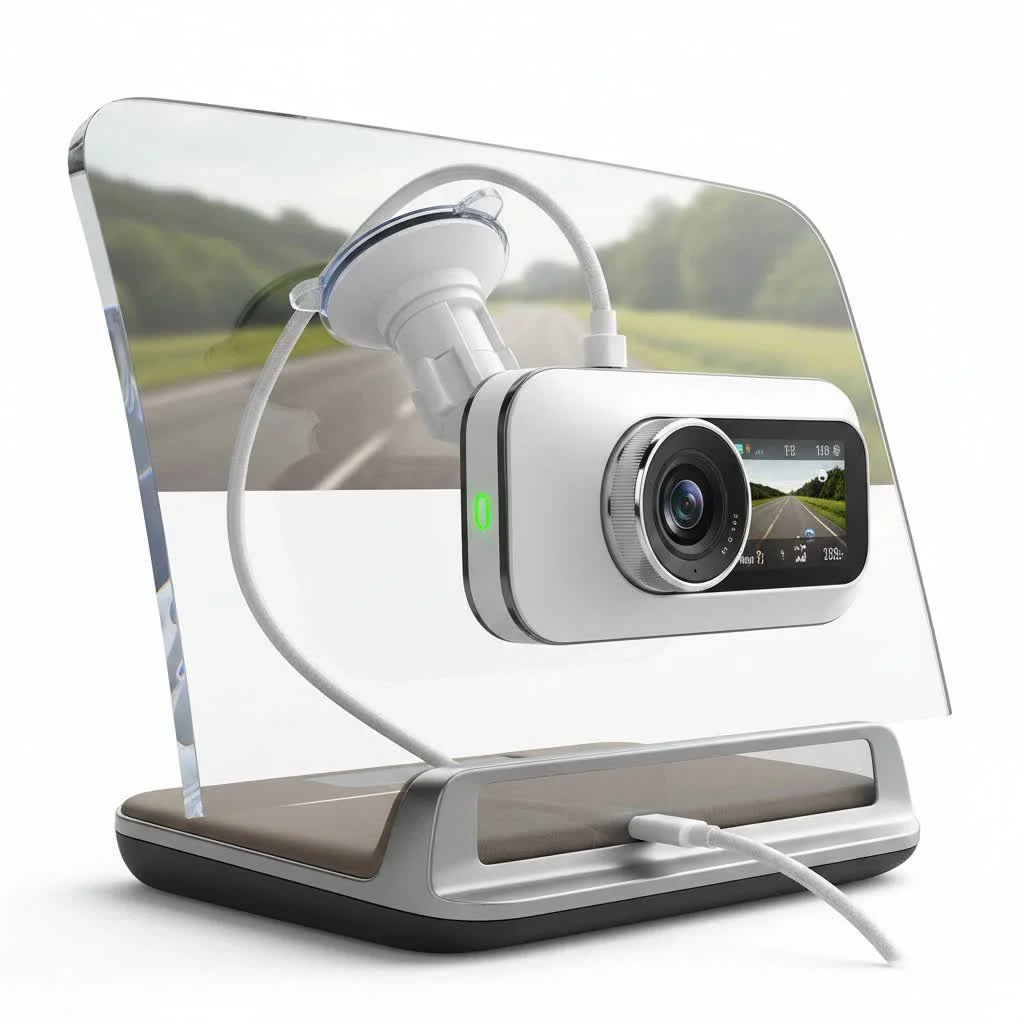
First Impressions and Core Features
Right out of the box, the Rove R2-4K feels sturdy and well-built. Its compact design is a major plus, ensuring it doesn’t obstruct your view when mounted on the windshield. But the real magic lies in its powerful hardware and user-centric features that are designed for the real world. For expert automotive dash reviews on this site.
Crystal-Clear 4K Ultra HD Recording
The headline feature is, of course, its ability to record in stunning 4K resolution (2160p). This clarity is crucial for capturing critical details like license plates, street signs, or the faces of individuals involved in an incident. The Rove R2-4K utilizes a high-performance sensor that delivers exceptionally sharp and vibrant footage during the day. This level of detail can be the deciding factor in an insurance claim or a legal dispute, providing indisputable evidence of what transpired.
Superior Night Vision Technology
Driving at night presents a unique set of challenges for any camera. The Rove R2-4K addresses this with its advanced night vision technology. It combines an F1.8 large aperture lens with a unique Wide Dynamic Range (WDR) system. In practical terms, this means the camera can balance the light and dark areas of the footage, reducing glare from headlights and illuminating darker parts of the road. The result is clearer, more usable video in low-light conditions, a scenario where many other dash cams falter.
Built-in Wi-Fi and GPS for Total Control
Gone are the days of fumbling with tiny screens or removing SD cards to view your footage. The Rove R2-4K features built-in Wi-Fi that pairs directly with the ROVE App on your smartphone (available for both iOS and Android). From the app, you can instantly view, manage, download, and share your recordings.
The built-in GPS is another game-changing feature. It accurately logs your driving location and speed, embedding this data into your video files. This provides a complete record of your journey, which can be crucial for contextualizing events during an incident. You can even view your route on Google Maps via the app or the desktop GPS player.
How Do Its Smart Functions Work?
Beyond its core recording capabilities, the Rove R2-4K dash cam is packed with smart functions that automate its operation and enhance your security.
What is Loop Recording?
|
Our Picks for the Best Dash Cam in 2026
As an Amazon Associate I earn from qualifying purchases.
|
||
| Num | Product | Action |
|---|---|---|
| 1 | ROVE R2-4K DUAL Dash Cam Front and Rear, STARVIS 2 Sensor, FREE 128GB Card Included, 5G WiFi - up to 20MB/s Fastest Download Speed with App, 4K 2160P/FHD Dash Camera for Cars, 3\" IPS, 24H Parking Mode |

|
| 2 | Navycrest 4K Dash Cam Front and Rear with 64GB Card, Built-in 5G WiFi, Dash Camera for Cars 4K Front and 1080P Rear, Dashcams for Cars Loop Recording, Gravity Sensor, 24-Hours Parking Mode |
|
| 3 | REDTIGER 4K Dash Cam Front Rear, STARVIS 2 Sensor, Free Card Included, 5.8GHz WiFi-20MB/s Fast Download, Dash Camera for Cars with GPS, WDR Night Vision, 170°Wide Angle, 24H Parking Mode(F7NP) |
|
| 4 | VIOFO A229 Plus Dash Cam Front and Rear, Dual STARVIS 2 Sensors, 2 Channel HDR, 1440P+1440P Voice Control Car Dash Camera, 5GHz Wi-Fi, Voice Control, Ultra-Precise GPS (SD Card Not Included) |
|
| 5 | Dash Cam Front and Rear, 2.5K+1080P Dual Dash Camera for Cars, 2’’ Display Mini Car Camera, G-Sensor Dashcam, Night Vision, 24H Parking Mode, Loop Recording, 170°Wide Angle, 32GB Card Included |
|
| 6 | Dash Cam Front and Rear, 1080P Dash Camera for Cars, 3 Channel Car Camera Front Rear and Inside with 32GB Card, Loop Recording, Night Vision, HDR, 24Hr Parking, G-Sensor |
|
| 7 | REDTIGER 4K STARVIS 2 Dash Cam Front and Rear, 5GHz WiFi 20MB/s Download, 128GB Card Included, Voice Control, Dash Camera for Cars with 3.18\" Touch Screen, GPS, Loop Recording, Parking Mode(F7N Touch) |
|
| 8 | 4K Dash Cam Front, Built-in 5G WiFi, 64GB Card Included, Dash Camera for Cars, Mini Dashcam with Super Night Vision, Loop Recording, G-Sensor, 24 Hours Parking Monitor, Support 256GB Max |
|
| 9 | Dash Cam 1296P Front Dashcam, V300 WiFi Dash Camera for Cars with App, Night Vision, Mini Hidden Single Car Camera, Loop Recording, 24H Parking Mode, Support 256GB Max, Black |
|
| 10 | IIWEY N5 4 Channel Dash Cam 360° View, 1080P Front and Rear Inside, Left Right Dash Camera for Cars, 8 IR Lamps Night Vision, 5G WiFi & APP Control, G-Sensor, Parking Mode, with a Free 128GB SD Card |
|
Loop recording is a standard, must-have feature that prevents you from ever running out of storage space. The camera records video in short segments (typically 1, 3, or 5 minutes). Once the SD card is full, it automatically overwrites the oldest, unlocked video file to make room for new recordings. This ensures the camera is always recording without any manual intervention.
How Does the G-Sensor Protect Important Files?
The built-in G-sensor (Gravity Sensor) is your camera’s emergency button. It detects sudden impacts, such as a collision or hard braking, and automatically locks the current video file. This prevents the clip from being overwritten by the loop recording function, preserving the critical evidence when you need it most. The sensitivity of the G-sensor can be adjusted to prevent it from triggering over potholes or normal road bumps.
“The G-sensor is one of the most critical passive safety features in a modern dash cam. It works silently in the background, ensuring that the moments that matter most are protected without the driver ever having to think about it.” – David Chen, Automotive Technology Expert.
Understanding the 24-Hour Parking Monitor
For protection when you’re away from your vehicle, the Rove R2-4K offers a 24-hour parking monitor. When activated, the camera enters a standby mode. If the G-sensor detects an impact (like someone bumping into your car), the camera will wake up and record a short, locked video. To use this feature effectively, the camera requires a constant power source, which is typically achieved through a hardwire kit connected to your car’s fuse box.
Step-by-Step Installation Guide
Installing the Rove R2-4K dash cam is a straightforward process that most people can complete in under 30 minutes.
- Choose a Location: Find a spot on your windshield that provides a clear view of the road without obstructing your vision. The best place is usually behind the rearview mirror.
- Clean the Windshield: Thoroughly clean the area with a glass cleaner or the included wipe to ensure the adhesive on the suction mount sticks properly.
- Mount the Camera: Attach the suction cup mount to the windshield and slide the dash cam into place. Adjust the lens angle to capture a level view of the road ahead.
- Connect the Power: Plug the included car charger into your vehicle’s 12V power outlet.
- Route the Cable: Run the power cable from the camera to the power outlet. For a clean installation, tuck the cable into the headliner, down the A-pillar, under the glove box, and to the center console. Most car trim has enough flexibility to hide the cable without any tools.
- Power On and Format: Start your car to power on the dash cam. It’s crucial to format the SD card within the camera’s settings before you start recording to ensure compatibility and proper function.
Frequently Asked Questions (FAQ)
What is the best SD card for the Rove R2-4K?
It is highly recommended to use a high-endurance Class 10, U3 Speed Micro-SD card. The Rove R2-4K supports cards up to 512GB. Using a high-endurance card is critical as it’s designed for the constant rewriting that occurs with loop recording.
Can the Rove R2-4K record audio?
Yes, it has a built-in microphone to record audio inside the vehicle. This feature can be easily turned off in the settings if you prefer not to record cabin conversations.
How do I view my recorded videos?
You can view videos directly on the camera’s 2.4-inch LCD screen, or more conveniently, you can connect to the camera via Wi-Fi and use the ROVE App on your smartphone to view, download, and share footage.
Does the camera work in extreme temperatures?
The Rove R2-4K is designed to operate in a wide range of temperatures, from -4°F to 158°F (-20°C to 70°C). Its supercapacitor provides more reliability in extreme heat compared to traditional lithium-ion batteries.
Is the Rove R2-4K dash cam worth the investment?
Absolutely. For its price point, it offers a feature set and video quality that rivals many more expensive models. Its combination of 4K resolution, excellent night vision, built-in GPS and Wi-Fi, and user-friendly smart functions makes it a powerful and reliable tool for any driver.
Final Verdict: A Smart Investment for Every Driver
After extensive use and testing, the Rove R2-4K dash cam proves to be a standout performer. It delivers on its promise of high-quality video recording while packing in the essential features that modern drivers need. Its reliability, ease of use, and robust feature set provide peace of mind on the road, knowing that every moment is captured in stunning clarity. Whether you’re a daily commuter, a road trip enthusiast, or a professional driver, the Rove R2-4K is a worthy investment in your safety and security.
Frequently Asked Questions
What type of SD card is recommended for the Rove R2-4K?
For optimal performance, a high-endurance Class 10, U3 Speed Micro-SD card is highly recommended for the Rove R2-4K. This dash cam supports cards up to 512GB, and high-endurance cards are essential due to the constant data rewriting involved in loop recording.
Can the Rove R2-4K dash cam record audio inside the vehicle?
Yes, the Rove R2-4K dash cam includes a built-in microphone capable of recording audio within the vehicle. Users have the option to easily disable this feature in the camera's settings if they prefer not to record cabin conversations.
What are the methods for viewing recorded videos from the Rove R2-4K?
Recorded videos from the Rove R2-4K can be viewed directly on its 2.4-inch LCD screen. Alternatively, users can connect to the camera via its built-in Wi-Fi and use the ROVE App on their smartphone to conveniently view, download, and share footage.
What temperature range can the Rove R2-4K dash cam withstand?
The Rove R2-4K dash cam is engineered to operate reliably in a broad temperature range, specifically from -4u00b0F to 158u00b0F (-20u00b0C to 70u00b0C). Its supercapacitor technology enhances its durability and performance in extreme heat compared to dash cams using traditional lithium-ion batteries.
Is the Rove R2-4K dash cam a worthwhile purchase for drivers?
Yes, the Rove R2-4K dash cam is considered a worthwhile investment due to its competitive price point and comprehensive feature set. It offers 4K resolution, excellent night vision, integrated GPS and Wi-Fi, and user-friendly smart functions, making it a reliable tool for enhancing driver safety and security.
Install the Rove R2-4K Dash Cam
This guide provides step-by-step instructions for installing your Rove R2-4K dash cam quickly and efficiently, typically in under 30 minutes.
Select a spot on your windshield that offers a clear view of the road without obstructing your driving vision. The ideal position is often behind the rearview mirror to keep it discreet.
Thoroughly clean the chosen area on your windshield using a glass cleaner or the provided wipe. This ensures the suction mount's adhesive creates a strong, lasting bond.
Attach the suction cup mount securely to the cleaned windshield and then slide the dash cam into place. Adjust the camera's lens angle to ensure it captures a level and comprehensive view of the road ahead.
Plug the included car charger into your vehicle's 12V power outlet. Route the power cable from the camera to the outlet, tucking it neatly into the headliner, down the A-pillar, and under the glove box to the center console for a clean, professional installation.
Start your car to power on the dash cam. It is essential to format the SD card directly within the camera's settings before beginning any recording. This step ensures proper compatibility and optimal function of the device.
Get our weekly buyer guide
Practical specs, not advice. Unsubscribe anytime.
I was looking for a dash cam with integrated GPS and the Rove R2-4K delivered. It’s so helpful to have the speed and location data embedded in the video, especially for longer trips. The build quality feels really robust too, like it can handle daily use without a problem. Definitely gives me peace of mind.
I’ve been using the Rove R2-4K for a few weeks now and I’m really impressed. The 4K Ultra HD recording is no joke – I had a minor fender bender last week and the footage was so clear, you could read the other driver’s license plate without any issue. The compact design is also a huge plus, it doesn’t block my view at all.
This dash cam is pretty solid. The night vision is definitely superior to my old one, which was a big selling point for me since I do a lot of driving after dark. Setting up the Wi-Fi was a bit finicky at first, but once it connected, transferring files to my phone was super easy. Overall, a great upgrade for road security.
The Rove R2-4K has some great features like the G-sensor and loop recording, which work perfectly. My only real complaint is with the 24-hour parking monitor. It seems to drain my car battery a bit faster than I expected, even with the hardwire kit. Still, the video quality is excellent when it’s recording.