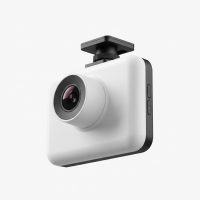
In the world of automotive safety, a standard dash cam offers a solid first line of defense, recording the road ahead. But what about the story unfolding behind you? Rear-end collisions, parking lot mishaps, and tailgaters often go undocumented, leaving you vulnerable in an insurance dispute. This is where a dual channel dash cam becomes an essential upgrade, providing a comprehensive, 360-degree witness to your journey. Think of it not just as a camera, but as total peace of mind on wheels.
As a seasoned automotive tech expert with over 15 years in the field, I’ve seen countless situations where rear-facing footage was the deciding factor. It’s the difference between a frustrating “he-said, she-said” scenario and having indisputable proof. This guide will walk you through everything you need to know about these invaluable devices. For browse all automotive dash articles on this site.
What Exactly is a Dual Channel Dash Cam?
A dual channel dash cam, also known as a front and rear dash cam, is a system that uses two separate camera lenses to record video simultaneously. One camera faces forward to capture everything in front of your vehicle, while a second, smaller camera records the view through your rear window. Both cameras are connected and record to the same memory card, ensuring all your footage is synchronized and stored in one place.
This setup provides a complete narrative of any incident, capturing not just the car that pulls out in front of you, but also the vehicle that was following too closely behind. It’s the most effective way to ensure you have a full account of events, no matter which direction the trouble comes from.
The Undeniable Benefits: Why Two Cameras Are Better Than One
Opting for a dual channel dash cam isn’t just about having more footage; it’s about gaining a significant advantage in safety and security.
Comprehensive Accident Evidence
The most significant benefit is the complete coverage. In the event of a rear-end collision—one of the most common types of accidents—the rear camera provides irrefutable proof of the other driver’s fault. This footage is invaluable when dealing with insurance claims, preventing fraudulent accusations, and ensuring you are not wrongly held liable.
All-Around Parking Protection
Many dual channel systems come equipped with an advanced parking mode. When hardwired to your vehicle’s battery, these cameras can detect and record any bumps or motion while your car is parked. This means if someone dings your door in a parking lot or a hit-and-run occurs, you’ll have video evidence of the perpetrator’s vehicle.
Deterrent Against Road Rage and Tailgating
|
Our Picks for the Best Dash Cam in 2026
As an Amazon Associate I earn from qualifying purchases.
|
||
| Num | Product | Action |
|---|---|---|
| 1 | REDTIGER 4K STARVIS 2 Dash Cam Front and Rear, 5GHz WiFi 20MB/s Download, 128GB Card Included, Voice Control, Dash Camera for Cars with 3.18\" Touch Screen, GPS, Loop Recording, Parking Mode(F7N Touch) |

|
| 2 | ROVE R2-4K DUAL Dash Cam Front and Rear, STARVIS 2 Sensor, FREE 128GB Card Included, 5G WiFi - up to 20MB/s Fastest Download Speed with App, 4K 2160P/FHD Dash Camera for Cars, 3\" IPS, 24H Parking Mode |
|
| 3 | Dash Cam 1296P Front Dashcam, V300 WiFi Dash Camera for Cars with App, Night Vision, Mini Hidden Single Car Camera, Loop Recording, 24H Parking Mode, Support 256GB Max, Black |
|
| 4 | Navycrest 4K Dash Cam Front and Rear with 64GB Card, Built-in 5G WiFi, Dash Camera for Cars 4K Front and 1080P Rear, Dashcams for Cars Loop Recording, Gravity Sensor, 24-Hours Parking Mode |
|
| 5 | Dash Cam Front and Rear, 2.5K+1080P Dual Dash Camera for Cars, 2’’ Display Mini Car Camera, G-Sensor Dashcam, Night Vision, 24H Parking Mode, Loop Recording, 170°Wide Angle, 32GB Card Included |
|
| 6 | Dash Cam Front and Rear, 1080P Dash Camera for Cars, 3 Channel Car Camera Front Rear and Inside with 32GB Card, Loop Recording, Night Vision, HDR, 24Hr Parking, G-Sensor |
|
| 7 | VIOFO A229 Plus Dash Cam Front and Rear, Dual STARVIS 2 Sensors, 2 Channel HDR, 1440P+1440P Voice Control Car Dash Camera, 5GHz Wi-Fi, Voice Control, Ultra-Precise GPS (SD Card Not Included) |
|
| 8 | IIWEY N5 4 Channel Dash Cam 360° View, 1080P Front and Rear Inside, Left Right Dash Camera for Cars, 8 IR Lamps Night Vision, 5G WiFi & APP Control, G-Sensor, Parking Mode, with a Free 128GB SD Card |
|
| 9 | REDTIGER 4K Dash Cam Front Rear, STARVIS 2 Sensor, Free Card Included, 5.8GHz WiFi-20MB/s Fast Download, Dash Camera for Cars with GPS, WDR Night Vision, 170°Wide Angle, 24H Parking Mode(F7NP) |
|
| 10 | 4K Dash Cam Front, Built-in 5G WiFi, 64GB Card Included, Dash Camera for Cars, Mini Dashcam with Super Night Vision, Loop Recording, G-Sensor, 24 Hours Parking Monitor, Support 256GB Max |
|
A visible rear-facing camera can actively discourage aggressive driving from others. When a driver sees they are being recorded, they are more likely to maintain a safe following distance and behave more responsibly, making your drive safer.
As automotive safety analyst, David Chen, often states, “A front-facing dash cam tells half the story. The rear camera provides the crucial context that can make all the difference in an insurance claim or a legal dispute.”
How to Choose the Best Dual Channel Dash Cam
With so many options on the market, selecting the right dual channel dash cam can seem daunting. Focus on these key features to ensure you get a reliable, high-performance system that meets your needs.
Video Quality and Resolution
Crystal-clear video is non-negotiable. Look for a system that offers at least 1080p (Full HD) resolution for both the front and rear cameras. For superior detail, especially for capturing license plates at a distance or in low light, consider models with 2K or even 4K resolution on the front camera. High Dynamic Range (HDR) and quality image sensors like Sony STARVIS are also critical for clear night vision.
Essential Features Checklist
- Loop Recording: This is a standard feature that continuously records video, overwriting the oldest files when the memory card is full. This ensures you never run out of space.
- G-Sensor: An integrated accelerometer detects sudden impacts, such as a collision or heavy braking. When triggered, it automatically locks the current video file, preventing it from being overwritten.
- GPS Tagging: A built-in GPS module embeds your vehicle’s speed and location data into the video files. This provides crucial context for any recorded incident.
- Wide-Angle Lens: A lens with a field of view between 140 and 170 degrees provides broad coverage of the road without significant “fisheye” distortion.
- Wi-Fi and App Connectivity: Modern dash cams use Wi-Fi to connect to a smartphone app, allowing you to easily view, download, and share footage without needing to remove the microSD card.
A Step-by-Step Guide to Installation
While professional installation is always an option, many users can install a dual channel dash cam themselves with a little patience. The goal is a clean setup with no dangling wires.
- Mount the Front Camera: Find the optimal position for the front camera, typically behind the rearview mirror. This placement keeps it out of your direct line of sight while providing a clear view of the road. Clean the windshield thoroughly before attaching the adhesive mount.
- Route the Power Cable: Plug the power cable into the front camera. Gently tuck the wire into the gap between the windshield and the headliner. Run it across the passenger side, down the A-pillar (the trim alongside the windshield), and under the glove box to your car’s 12V power outlet or fuse box for hardwiring.
- Run the Rear Camera Cable: Connect the long rear camera cable to the front unit. Route this cable alongside the power cable through the headliner, but continue along the roofline to the back of the vehicle.
- Mount the Rear Camera: Position the rear camera at the top center of your rear windshield. Before sticking it on, check the live view on the camera’s screen or your smartphone app to ensure the angle is correct.
- Connect and Tidy Up: Plug the cable into the rear camera and tuck any excess wiring into the headliner. Use a plastic trim tool to gently pry open panels to hide the wires for a seamless, professional-looking installation.
- Insert SD Card and Test: Insert a high-endurance microSD card, power on your car, and confirm that both cameras are recording correctly.
Frequently Asked Questions (FAQ)
Do I really need a dual channel dash cam?
If you want comprehensive protection that covers you from rear-end collisions, parking incidents, and tailgaters, a dual channel dash cam is a worthwhile investment. It provides a complete record of events that a front-only camera would miss.
Does the rear camera record in the same quality as the front?
Not always. In many mid-range models, the rear camera may have a lower resolution (e.g., 1080p) than the front camera (e.g., 4K). Premium systems are more likely to offer high resolution on both channels. Always check the specifications for both cameras.
How is a dual channel dash cam powered?
Most systems are powered through the car’s 12V cigarette lighter socket. However, to use parking mode, the dash cam needs to be hardwired to the vehicle’s fuse box. This provides constant power while the engine is off and is the recommended setup for full functionality.
Will a dual channel dash cam drain my car battery?
When properly hardwired using a kit with voltage cutoff protection, a dash cam will not drain your battery. The hardwire kit is designed to monitor your battery’s voltage and will automatically shut off the camera if the voltage drops below a preset level, ensuring you always have enough power to start your car.
How much video can a dual channel system store?
Storage capacity depends on the size of your microSD card and the video resolution. A 128GB card in a dual 1080p system can typically store around 10-12 hours of combined footage before loop recording begins.
Your Silent Witness on the Road
Investing in a dual channel dash cam is one of the smartest decisions a driver can make. It transforms your vehicle into a fortress of evidence, providing an unbiased account of everything that happens on the road ahead and behind. From daily commutes to long road trips, it works silently in the background, offering protection, accountability, and ultimately, invaluable peace of mind. Drive smarter and safer by equipping your car with a complete view of the road.
Get our weekly buyer guide
Practical specs, not advice. Unsubscribe anytime.